
For a media buyer, a payment card is no longer just a way to pay for ads. In 2026, it is a core part of the advertising infrastructure. The wrong card can stop campaigns, trigger payment declines, slow down scaling and even put an ad account under review.
This is especially painful for affiliate teams, traffic arbitrage specialists and freelancers working with Facebook Ads, Google Ads and TikTok Ads from regions with limited access to international payments. A regular bank card may work perfectly for personal purchases, but fail inside an ad account because of regional restrictions, billing mismatches, weak BIN reputation, currency conversion issues or transaction limits.
In this guide, we will break down what kind of card a media buyer needs, why BIN diversity matters, how to pay for Facebook ads, Google Ads and TikTok Ads with fewer payment issues, and how to build a card pool for a growing media buying team.
Why Regular Bank Cards Are Not Enough for Media Buying
A standard bank card may be fine for online shopping, subscriptions or daily expenses. Advertising platforms look at payments differently. They do not only check whether the card has enough funds. They also evaluate the country of issue, the card type, billing data, BIN reputation, previous failed payments, risk signals and the overall behavior of the ad account.
That is why a card that works for personal payments may still fail when added to Facebook Ads, Google Ads or TikTok Ads.
Regional Restrictions and Sanctions
One of the biggest problems for media buyers from Russia and the CIS is access to reliable international payments. Even if a card is active and funded, an ad platform may reject it because of the issuing country, billing region, account currency or compliance restrictions.
A common risk pattern looks like this:
- The ad account is registered in one country.
- The card was issued in another country.
- The account is accessed from a third region.
- The billing profile does not match the payment method.
- The first payment attempt happens too soon or for an unusually high amount.
For a regular user, this may look like a minor mismatch. For an advertising platform, it can look like a risky billing setup. The result is a declined payment, a suspended campaign or an additional account review.
So the real question is not only how to pay for Facebook ads, Google Ads or TikTok Ads. The real question is how to make the payment setup look consistent, stable and logical for the platform.
Transaction Limits and Payment Declines
Media buying usually involves frequent transactions. Platforms may run test charges, automatic charges, threshold based charges and repeated billing attempts. A regular bank card is often not designed for this type of usage.
Payment problems often happen when:
- The bank blocks frequent online transactions.
- The card has insufficient balance during an automatic charge.
- The card currency does not match the ad account currency.
- Online payment limits are too low.
- The card does not support 3DS properly.
- The bank rejects the merchant account used by the platform.
- The payment triggers an AVS check mismatch.
- Currency conversion creates an unexpected shortage.
For a media buyer, one failed payment can be enough to pause active campaigns. Several failed attempts in a row may damage the trust level of the ad account.
Risk of an Ad Account Ban Because of Poor Card Reputation
Advertising platforms treat payment methods as part of the risk profile of an ad account. If a card is connected to many failed payments, chargebacks, suspicious accounts or mass registrations, its BIN may perform worse in ad platform billing systems.
BIN stands for Bank Identification Number. These are the first digits of a card number. They help identify the card issuer, card type, payment network and country. For ad platforms, the BIN can be one of many signals used to evaluate whether the card looks trustworthy.
A bad BIN for Facebook Ads, Google Ads or TikTok Ads can lead to:
- Failed card verification.
- Declined first payment.
- Higher chance of billing review.
- Account spending interruptions.
- Additional verification requests.
- Increased risk of ad account restrictions.
If you already had a situation where your card was added but the payment failed, it is worth checking why Facebook declined the payment. In many cases, the issue is not just the card balance. It can be a combination of BIN reputation, billing country, MCC code, account history and failed payment attempts.
What Is a Virtual Card for Media Buying and Why BIN Diversity Matters
A virtual card for media buying is an online payment card that can be issued quickly and used for advertising platforms, subscriptions, SaaS tools and operational expenses. For traffic arbitrage teams, affiliate marketers and agencies, virtual cards are more flexible than regular bank cards because they can be issued for specific accounts, campaigns, buyers or projects.
But the main value is not simply that the card is virtual. The real value is the ability to manage many cards, separate budgets, choose suitable BINs, control limits and replace a card quickly if billing issues appear.
How BIN Affects Payment Approval
BIN affects how an advertising platform sees your card. It can show the issuing country, card type and card category. If the ad account country, billing information and card BIN do not match logically, the payment may look risky.
For example, if a Facebook Ads account is set up for one region, but the card BIN points to a completely different region, the platform may apply stricter checks. If the BIN has been overused by risky advertisers or linked to many chargebacks, the chance of approval may be lower.
This is why media buyers often need BIN diversity. Different campaigns, regions and ad accounts may require different card setups. A single universal card rarely works well at scale.
For stable launches, it is better to use cards for media buying that are designed for advertising payments, multi account workflows and regular billing activity.
Why Media Buyers Need Several Cards for Different Ad Accounts
A common beginner mistake is using one card for several ad accounts. At first, it looks convenient. In practice, it creates unnecessary risk.
If one card is linked to five, ten or twenty ad accounts, any problem with that card can affect the entire setup. A failed charge, card block, billing review or issuer restriction can stop several campaigns at once.
A safer structure is:
- One ad account.
- One dedicated card.
- One clear budget.
- One controlled risk area.
- One clean expense history.
This makes it easier to track ROI, identify failed payments, replace cards and separate expenses by buyer, client, offer or traffic source.
For teams, this structure also improves financial control. Each media buyer can work with their own card limits, while finance or team leads can monitor the full payment picture.
Specifics of Paying for Facebook Ads
Facebook Ads is one of the most sensitive platforms when it comes to billing signals. Meta does not only evaluate the payment itself. It also looks at the account behavior around that payment.
A new ad account, new card, high starting budget, suspicious login pattern and repeated failed charges can create a risky combination.
Facebook Payment Method Requirements
Facebook Ads usually supports major credit and debit cards, PayPal and selected local payment methods, depending on the country and currency of the ad account. But not every Visa or Mastercard will work equally well.
For media buyers, the key requirements are:
- The card must support online advertising payments.
- The card must have enough balance.
- The card currency should fit the ad account billing setup.
- The card BIN should not look risky.
- Billing data should not conflict with account settings.
- 3DS should work correctly if required.
- The card should not have a history of repeated failed charges.
A card for Facebook Ads should be stable enough for both first verification and ongoing automatic billing.
How to Warm Up a Card to Avoid Account Restrictions
Card warmup means starting with a new payment method gradually and carefully. The goal is not to bypass platform rules. The goal is to avoid sudden, suspicious billing behavior.
A practical card warmup approach includes:
- Do not add a new card to many ad accounts at once.
- Start with a small daily budget.
- Do not change the card, billing country, admins and login pattern on the same day.
- Keep extra funds on the card.
- Avoid several declined payments in a row.
- Use different cards for different ad accounts.
- Increase spend gradually instead of jumping from zero to a large budget.
For Facebook Ads, one of the riskiest scenarios is adding a fresh card to a new account and immediately trying to spend aggressively. If the first charge fails, the account may attract extra billing checks.
What to Do If a Facebook Ads Payment Is Declined
If your Facebook Ads payment is declined, do not immediately issue ten new cards and start testing them one by one. That can make the account look even riskier.
A better process is:
- Check the card balance.
- Check online payment limits.
- Check whether the card supports the billing currency.
- Check whether there is unpaid debt in the ad account.
- Try to complete the payment manually in the billing section.
- If the payment fails again, replace the card with a more suitable BIN.
- After replacing the card, do not increase the budget sharply.
If the ad account is already under review, avoid repeated failed payment attempts. Clean billing behavior matters.
Specifics of Paying for Google Ads
Google Ads can look more predictable than Facebook Ads, but its billing rules can be stricter. This is especially true for accounts using automatic payments and threshold based billing.
Google Ads Billing and Automatic Payments
Google Ads can charge advertisers automatically after ads start running. In many accounts, Google charges the primary payment method when the account reaches a billing threshold or at the end of a billing period.
This means your virtual card for Google Ads must be ready not only for the first setup, but also for recurring automatic charges. If the card fails during an automatic payment, campaigns can stop.
For media buyers, the key point is simple: always keep enough balance on the card. A campaign can be profitable, but if Google cannot charge the card, delivery may pause.
Why Google Can Be Stricter Than Facebook
Google pays close attention to country, currency, business information and available payment methods. If the billing setup looks inconsistent, payment issues may appear even when the card itself is valid.
Before launching Google Ads, check:
- The country of the ad account.
- The selected billing currency.
- Available payment methods for that country.
- Whether the card supports automatic billing.
- Whether a backup card is added.
- Whether the billing profile matches the payment setup.
Google Ads can be especially strict when payment data does not match the account structure. For scaling, it is better to plan accounts and cards before launching campaigns, not after the first decline.
How to Set Up a Backup Card
A backup card helps prevent campaign interruptions if the primary card fails. This is especially important for Google Ads accounts with automatic payments.
A good setup looks like this:
- Add a primary card for the account.
- Add a backup card with enough balance.
- Make sure both cards are active.
- Monitor payment attempts regularly.
- Replace cards before they become a problem.
For teams managing several accounts, backup cards can protect active campaigns from sudden pauses.
Specifics of Paying for TikTok Ads
TikTok Ads is widely used by media buyers, especially for fast testing, creative heavy campaigns and affiliate funnels. Its billing logic depends on the account country, payment model and available methods.
TikTok Ads can support several billing models, including prepay, automatic payment and monthly invoicing. The exact options depend on the account.
Card Support by Country
TikTok Ads payment methods vary by country and account type. A card that works in one TikTok Ads account may not work in another if the billing country, currency or account setup is different.
If your TikTok Ads payment does not go through, the issue may be caused by:
- Unsupported card country.
- Billing country mismatch.
- Insufficient balance.
- Failed 3DS verification.
- Currency conversion issue.
- Card type restrictions.
- Platform level billing review.
Before scaling TikTok campaigns, check how the account is billed and whether the card can handle repeated charges.
Minimum Deposit and Auto Top Up
With prepay billing, you add funds to the ad account first, and TikTok deducts spend from the available balance. With automatic payment, TikTok charges the card after spend is generated, usually based on billing thresholds or billing dates.
For media buyers, this means balance discipline is critical. If you use prepay, the ad account must be funded before campaigns spend. If you use automatic payment, the card must be ready for recurring charges.
A TikTok Ads payment setup should include:
- Enough starting balance.
- Clear spend limit.
- A card with stable online payment support.
- Proper 3DS support.
- Monitoring of automatic charges.
- Backup payment planning for active campaigns.
Comparison Table: Cards for Different Advertising Platforms
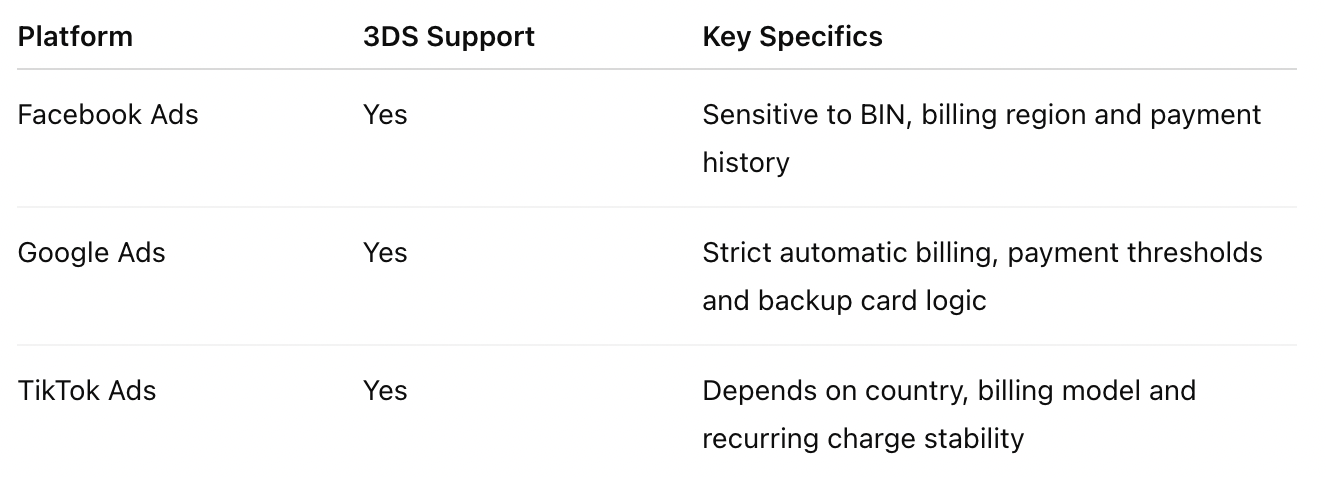
Minimum amounts and available payment methods can vary by country, currency and account type. Always check the billing settings inside the specific ad account before launch.
How to Scale a Media Buying Team With a Card Pool
When one media buyer works with one ad account, manual control may be enough. Once a team starts working with multiple buyers, clients, verticals and traffic sources, payment management becomes more complex.
A card pool helps separate budgets, reduce risk and make advertising payments easier to control.
Expense Management and Limits for Team Members
A media buying team needs to know who spends what, where and why. If all buyers use the same card, it becomes difficult to track performance, calculate ROI and identify problematic transactions.
A better team structure includes:
- Separate cards for each media buyer.
- Separate cards for each ad account.
- Daily and monthly limits.
- Cards grouped by client, project or vertical.
- Fast card blocking when needed.
- Transparent transaction history.
- Clear reporting for finance and team leads.
This allows teams to control team expenses without manual screenshots, messy spreadsheets or endless payment checks in chats.
For agencies working with multiple clients, a dedicated solution for agencies can make the payment structure cleaner from the start.
API Integration With Trackers and Internal Tools
At larger volumes, manual payment tracking becomes inefficient. Teams need to see card statuses, balances, transactions and limits inside their own systems.
Integration through API helps automate routine tasks such as:
- Pulling transaction data.
- Matching spend with ad accounts.
- Monitoring limits.
- Checking balances.
- Connecting card data with trackers.
- Building internal reporting.
- Detecting failed payments faster.
For media buying, API access is not just a technical feature. It helps teams understand which campaigns are profitable, which accounts need attention and where billing issues are slowing down growth.
Checklist: How to Avoid an Ad Account Ban
- Use a separate card for every ad account.
- Do not link one card to too many accounts.
- Keep enough balance for automatic charges.
- Choose a card with a suitable BIN for the account country and currency.
- Do not increase the budget too aggressively after adding a new card.
- Do not change card, billing data, admins and login pattern at the same time.
- Add a backup card for accounts with automatic billing.
- Avoid repeated declined payments.
- Separate cards by buyers, projects and verticals.
- Check MCC code, 3DS support, transaction limits and currency conversion before launch.
FAQ
Can I Pay for Facebook Ads With Cryptocurrency?
Facebook Ads does not usually accept cryptocurrency directly as a standard payment method. However, a media buyer can use a virtual card service with crypto top ups. In this case, you top up your balance with crypto, issue a card and pay for Facebook Ads with that card.
What Is the Minimum Limit on a Virtual Card for Google Ads?
There is no universal minimum limit. It depends on the account country, billing currency, payment model and campaign budget. For a test launch, a small balance may be enough. For automatic payments, it is better to keep extra funds on the card to avoid failed charges.
What Should I Do If the Card Is Added but the Payment Does Not Go Through?
First, check balance, limits, online payment support, currency and 3DS. Then check whether the ad account has unpaid debt or billing restrictions. If everything looks correct but the payment still fails, the problem may be related to BIN, card region or card reputation. In that case, use another card with a more suitable setup for advertising payments.
How Many Cards Does a Team of 5 Media Buyers Need?
At minimum, each media buyer should have a separate card. In practice, it is better to count cards by ad accounts, not only by team members. If each buyer manages several accounts, the safer structure is one account, one card. It is also useful to keep backup cards for important campaigns.
Can I Use One Card for Several Ad Accounts?
Technically, it may work in some cases. For media buying, it is risky. If the card gets declined, blocked or reviewed, several ad accounts may be affected at once. Separate cards reduce the risk and make spend easier to manage.
Which BINs Work Better With Facebook Ads?
There is no single best BIN for Facebook Ads. A good BIN should fit the billing country, currency and account setup. It should also have a clean reputation and stable payment performance. For Facebook Ads, consistency matters more than chasing a magic BIN.
What Is Virtual Card Warmup?
Virtual card warmup is the gradual use of a new payment method. It usually means starting with smaller budgets, avoiding sudden account changes, keeping enough balance and increasing spend carefully. This helps reduce payment declines and billing checks.
Read Also
- Top Media Buying Verticals in 2026 and How to Scale Them
- Best Paid Traffic Sources for Affiliate Marketing in 2026
Conclusion
In 2026, stable ad payments are as important for media buying as creatives, offers, trackers and analytics. If your card fails, has an unsuitable BIN, does not support the right currency or is linked to too many accounts, your team can lose time, money and active campaigns.
The best approach is to use dedicated virtual cards for different ad accounts, keep enough balance, avoid repeated payment declines, set up backup cards and control expenses across the team.
FuncCards helps media buyers and agencies build a reliable payment infrastructure for Facebook Ads, Google Ads, TikTok Ads, online services and operational expenses. You can issue virtual cards, top up your balance with crypto, separate team expenses and scale ad campaigns without billing chaos.
Register with FuncCards and set up virtual cards for advertising, services and team expenses.